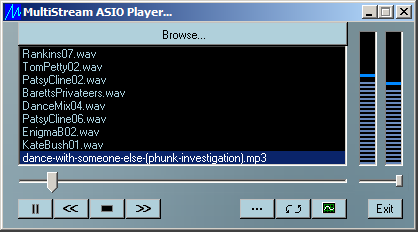
Here is an mp3 player with features not available in any of today's top players, such as the Windows Media Player, Real Player, Winamp, etc. In the first place, it will play music on professional sound cards via ASIO, as well supporting all types of sound cards via DirectSound or even the older Window's multimedia system waveformat audio interface. The desired driver is selectable via the options menu.
Today you hear of "gapless play" which is supported by several players. The idea is that that one song should follow the next without dropping even one sample between them, so there will be no pause between tracks. However, since most music will have a long fade out at the end, while the next may start with a long fade up, you will still hear a gap of a few seconds between most tracks. The MStream Player, however, allows for "overlapped play", and is one of the few players that does this. You may choose to overlap the start of the next track with the end of the current track by up to 20 seconds, for a truly gapless "live mix" effect. MStream also allows you to set a fade out of up to 2 seconds for when you skip from one track to the next. When you toggle between Play and Pause, there is a brief built in fade effect.
The MStream Player features a built in audio test signal generator that permits you to test left and right channels independently with either sweep or sine waves. The selectable musical notes are calculated to such a precision as to become a precise standard reference for the modern Even Tempered Scale to which you can calibrate your equipment and musical instruments. It will also generate a couple of tunes in real-time via the test tone function for testing when you are just setting up and don't happen to have any music files handy. MStream plays Window's pcm wave files and most standard mp3 files. It features a unique mp3 file parser for fast and agile seeking, and the ability to correct many kinds of corruption found in mp3 files traded over the internet. For more details, see the Readme that comes with the downloaded zip package.
Being a very light-weight application, MStream lacks many features common in today's players, nor does it have a pretty user interface. It will not play Microsoft's wma format, does not support music with DRM (Digital Restrictions Management), will not play absolutely every mp3 format you can run into these days such as "free bit rate" mp3, will not play your CDs, and will not play 8 bit audio. It is not the goal of MStream to become a typical over-bloated audio player. MStream's reason for being is to demo various DLLs I have available for audio software developers. There are so many players loaded with feature available today, that there is no point in trying to add yet another to the mix. However, MStream should be more than adequate for playing quality music and may grow and evolve depending on the level of interest. You may miss the unique features it does support when you go back to your previous player. In keeping with being fast loading and ultra light-weight, nothing is installed but a single entry added to your Window's registry. Please give me your feedback about how well this works out for you or any suggestions you may have.
What's new in version 4.02...
Added support for ASIO DACs that take 32 bit floating point samples
What's new in version 4.01...
Fixed all issues with displaying on high DPI monitors, and another issue where it didn't display properly when screen wakes from sleep.
What's new in version 4.00...
Version 4.00 brings a long overdue update - recompiled with the latest compiler as of Jan. 2024 (VS2022). The need for a recompile of the many components had held me back from other fixes. Also now sets sample rate for ASIO on init to 44100 samples per second. (Previously if the sample rate was not 44100 it asked you to set it to that.) Unfortunately, it has a problem with scaling on High DPI monitors, though it works fine otherwise. The work around until I fix this is to right click on your desktop, go to "Display Settings", and set scaling to 100%. This is to be hopefully resolved in the next update.
What's new in version 3.03...
This was a bug fix version. The MStream Player was made to support up to 8 DirectX devices, but it seems these days, with virtual devices and multiple ASIO devices with a DirectX driver, people can have more than 8 such devices, which caused MStream to crash. Now it has been modified to handle up to 16 DirectX devices. Beyond that, it wasn't reading some wave files produced by Wavelab because it wasn't expecting header data > 2K. Now MStream will handle .wavs with up to 4K of header data.
What's new in version 3.02...
The current version 3.02 was updated to support the ASIO 32 bit sample type, and the entire project, which had been maintained until now on a WinXP platform under MSVC 6.x, was rebuilt under VS2008 on Windows 7. Sadly this did not resolve display issues on high DPI monitors with Windows 7. I would need new graphics for that. The remote commands the MStream Player will respond to have also been expanded. This document should be all you need if you are building an app to control the MSteamPlayer from your smart phone, but you may contact me if you need a little support. I myself have created a little Android app and companion Windows app to provide remote control of MStream over the internet, but this is not ready for publication yet.
What's new in version 3.01...
Just a minor bug fix. Turned out there was a bug in the code path that processed mp3s embedded in a RIFF structure. One encounters very few of this type of file these days, but they were quite common many years ago, and there may be still a few around.
What's new in version 3.00...
This is a big update! This version got a new source engine, featuring a new mp3 parser/decoder and interpolator, and the two new options described in the readme that were requested by a rock band in Australia. They use the MStream Player to play their material before the show begins and during the intermission. The MStream Player has been getting ever more use by professionals, I have discovered, and this has motivated me to make it a more professional application.
I was able to remove a substantial amount of old, over-bloated code with this update and can now dream of adding even more new options when I get the time. The previous version, I discovered to my embarrassment, was not seeking properly on material with sample rates other than 44,100. This new source engine corrects that and provides precision seeking at any sample rate. This new version finally gave up on the old configuration files and went to using the registry instead. Config files just don't cut it when starting the app up from a location other than its home directory. If you are upgrading from a previous version, just drop the new version into the same folder with the old, overwriting whatever is there. Your current configuration will be read in from the old configuration files and recorded in the registry.
What's new in version 2.02...
This version got a next generation mp3 parser - much faster than the previous version and even more rugged. The new parser will even correct some common types of corruption found in mp3s passed around the internet.
What's new in version 2.01...
Finally fixed how the volume control setting is reloaded from the configuration file. Previously it did restore the position on the slider beautifully, but did not set the volume level itself. (Thanks DrawnRazor for so politely pointing this out to me. I guess I didn't really understand the problem when you mentioned it to me a long time ago now.)
What's new in version 2.00...
This is a major version change. I have added the capability to play files of any sample rate via 8 point Lagrange interpolation. All audio is interpolated to CD quality 44100 samples per second if it was at a different sample rate.
What's new in version 1.06...
Version 1.06 has improved code for the VU meters and the shuffle algorithm. Beyond that, now it remembers where the volume control was positioned last time the application ran. It also has improved compatibility with MP3Toys - detecting more messages sent by that application, and improved capability in command line mode. It has more robust code behind the OpenFileDialog, as one person reported a strange bug here that I was unable to duplicate.
What's new in version 1.05...
Version 1.05 is mainly a bug fix version. Though mp3s at 32,000 samples per second resolution are not supported, it was discovered that if such a file was loaded inadvertently it would crash the application. That is now fixed so that such a file will merely play at the wrong speed (44.1 K sample per second) and no longer crash. There is one more additional feature added. When the MultiStream Player is first opened or shutdown, it plays a brief sound effect to announce itself. Though this little swept tone is less than half a second in duration and attenuated to 24 dBs down, at least one user commented that the sound effect almost knocked him out of his socks when he initialized the application with his speaker volume up full. If you don't like that little sound effect, simply place an empty text file titled "NoZap.txt" created with Notepad or whatever and place it into the folder with MStream.exe. This will turn off the sound effect.
What's new in version 1.04...
With version 1.04 we now have the capability of loading play lists of the form "MyPlayList.m3u", such as created via Winamp or other play list editors. To load a play list, click on the Browse button in MultiStream Player, and near the bottom of the resulting Open File Dialog, where it says "File types", select "Play list". Suddenly all files of type .m3u will become visible, and you may select as many as you wish to load at one time. You must remember that any file types within that play list that are not supported by MultiStream Player (such as .wma) will be ignored, along with any URLs. MultiStream Player will also ignore all comment lines (these begin with a '#').
Beyond this, we have another new capability, and that is the ability to employ the MultiStream Player as the default player for your system. Simply enter the Configurations Control Panel and select "Folder Options". From there, in the tab "File Types", you may set the MultiStream Player as the default player to open files of type .wav and .mp3, and even type .m3u, though this last is better left to open with your favourite play list editor. You can always play an .m3u play list by right mouse clicking on the file in Windows Explorer, then choosing to open it with the MultiStream Player. With MultiStream Player set as the default player, you may now double click on music files in Windows Explorer with the appropriate extension, and MultiStream Player should pop up and play them. It opens much faster than other players when doing this - very useful for previewing songs. We must note here, that since the MultiStream Player does not write anything to your Registry, the only way it knows the path to its configuration files is if it is actually opened within the folder where you keep it. If called from Windows or another application, it will look for configuration files on the path from which it was called, and will of course not find them there. The simple work-around is to open the MultiStream Player in the folder where it resides first, before you begin clicking on music files to preview them. Files selected will then be sent to the opened copy of the application. MultiStream Player will now also work as the external player in file organizers such as "MP3Toys". However, again it will lose knowledge of the path to its configuration files. The solution is to reconfigure your preferences the first time MultiStream Player is opened by MP3Toys. These files will then be saved in the MP3Toys application folder, and thereafter be found whenever opened by MP3Toys.
George W. Taylor
https://www.TropicalCoder.com
31/Jan/2024